
Start by improving the lighting in your home. Brighter, focused light—like a task lamp for reading or under-cabinet lights in the kitchen—reduces eye strain and helps you see details more clearly. For hearing, try sitting closer to the person you're talking to or facing them directly so you can see their lips and expressions.
When reading fine print, use a magnifying sheet or a handheld magnifier. You can also adjust the font size on your phone or tablet in the settings menu. For listening to conversations, consider a simple pocket amplifier with headphones—it boosts sound without making everything too loud.
If you enjoy audiobooks or the Bible, many libraries offer free digital downloads. You can listen on a basic MP3 player or a smartphone with large buttons. For TV, wireless headphones that connect to your set let you turn up the volume without disturbing others.
To stay safe at night, install motion-sensor nightlights in hallways and bathrooms. A flashlight with a wide beam by your bedside also helps. For phone calls, look for phones with built-in captioning that displays what the caller says in real time—it's like closed captions for your phone.
Dressing can be easier with adaptive tools like a buttonhook or a long-handled shoehorn. These simple devices reduce the need for fine motor skills or bending. And for reaching items on high shelves, use a lightweight reacher grabber instead of stretching or climbing.
The key is to try one change at a time and see what works for you. Many of these solutions are inexpensive and available at drugstores or online. If you have specific concerns about your vision or hearing, check with your doctor or an eye and ear specialist for personalized advice.
With the right approach, you can keep enjoying the activities that matter most—reading, talking, watching, and moving through your day with confidence. And when you're ready, there are helpful tools designed to make these adjustments even easier.
The products below are our picks for these needs. This article contains affiliate links — as an Amazon Associate we earn from qualifying purchases, at no additional cost to you.
1. Read Fine Print Again
Struggling to read medication labels, menus, or hobby instructions? A digital magnifier with auto-focus and simplified buttons makes it easy to enlarge text and images. The Ruby 7 HD helps you see details clearly, whether you're reading a book or working on crafts. Ideal for seniors with low vision or macular degeneration.
Helpful product to consider (paid link)

【High Power Magnification】This 5.0 inch portable magnifier reading aids provide 2X-32X zoom magnification, the unit has been an absolute lifesaver for who has macular degeneration. With this unit you can shop the grocery store, read restaurant menus, plus magazines and books.
View on Amazon2. Hear Conversations Clearly
If you find yourself asking people to repeat themselves, a personal sound amplifier can help. With auto-gain and directional microphone, the PocketTalker Ultra focuses on speech while reducing background noise. This device is perfect for one-on-one chats or small group settings, giving you more confidence in social situations.
Helpful product to consider (paid link)

Smart Auto-Gain Control – Enjoy crystal-clear sound at all times. iRoger automatically balances audio levels to enhance voices and fine details without distortion or sudden volume spikes. Includes two comfortable listening options—over-the-head headphones earbuds with soft foams.
View on Amazon3. Listen to Books and Bible
An audiobook player designed for seniors combines an eReader and audio player in one device. The Victor Reader Stream comes with headphones and a simulated leather case, making it easy to enjoy books, the Bible, or other audio content. Great for those who prefer listening over reading due to vision issues.
Helpful product to consider (paid link)

Preloaded NKJV & NIV Audio Bible: Includes New King James Version and New International Version for Bible reading, scripture study, devotional use, and Audio Bible listening right out of the box
View on Amazon4. Watch TV Without Disturbing Others
Wireless TV headphones let you hear every word of your favorite shows without turning up the volume. The TV Ears 5.8GHz system offers easy setup and compatibility with most TVs. Perfect for seniors with hearing loss who want to enjoy TV without bothering family members.
Helpful product to consider (paid link)

Private Listening Without Disturbing Others: Enjoy a comfortable home TV experience with these wireless headphones for TV. Whether it’s a late-night movie or an evening show, you can clearly hear dialogue at your own volume without disturbing others at home. Ideal for shared living spaces, the tv headphones allows independent volume control so you enjoy every detail while keeping the room quiet for family members
View on Amazon5. See Safely in the Dark
Motion sensor lights under cabinets or in hallways provide automatic illumination when you need it. The Mr. Beams LED lights are rechargeable and dimmable, helping prevent falls and making nighttime trips safer. Ideal for seniors who get up at night or need extra light in dim areas.
Helpful product to consider (paid link)
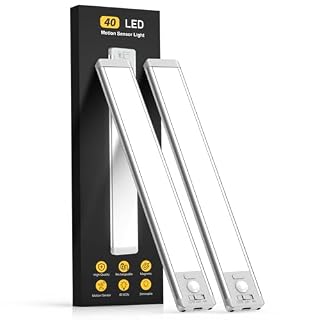
Upgraded Motion Sensor Under Cabinet Lights: Setting the under cabinet lights on motion sensor mode, they auto-on when human motion is detected within 120°and 10ft in a dark or low light environment, and auto-off after about 20 seconds of no motion detected. No longer have to worry about tripping on the step in the dark trying to turn on the switch
View on Amazon6. Talk on the Phone With Captions
A captioned telephone displays written captions of what the caller says, making phone conversations easier for those with hearing loss. The CapTel 840i features a large touch screen and answering machine for added convenience. This phone is a game-changer for seniors who struggle to hear on the phone.
Helpful product to consider (paid link)

Captions in Real Time: This captioned telephone for hearing impaired users allows you to listen and read large, real-time captions on an easy-to-read touchscreen so you don’t miss out on conversations. It turns everyday phone calls into clear, confident conversations with loved ones
View on Amazon7. Dress With Ease
Button hooks and zipper pulls are simple aids that help you fasten buttons and zippers with one hand. The EZ-Dress button hook and zipper pull set reduces frustration and promotes independence when dressing. Great for seniors with arthritis, limited dexterity, or after a stroke.
Helpful product to consider (paid link)

♛ Effortless Buttoning: Button Hook with Zipper Pull are expertly designed to effortlessly secure small, medium, and large round buttons, facilitating quick and easy buttoning of dresses, shirts, collars, and more
View on Amazon8. Reach Without Stretching
A lightweight grabber tool extends your reach to pick up items from the floor or high shelves. The Gopher II grabber is handy for grabbing trash, clothing, or objects without bending or straining. Essential for seniors with mobility issues or back pain.
Helpful product to consider (paid link)

EASY GRABBING: Reacher grabber to pick up items with easy, picks up coins, envelops, trash etc, easily pull the trigger, it starts work, reduces labor intensity, makes our work become easier.
View on AmazonFrequently Asked Questions
Do I need a prescription for a hearing amplifier?
No, personal sound amplifiers are over-the-counter devices designed for mild to moderate hearing loss. They are not medical devices and do not require a prescription.
Can the digital magnifier be used for hobbies like knitting?
Yes, the magnifier can enlarge patterns, instructions, or fine details, making it useful for knitting, sewing, or other crafts.
How do wireless TV headphones connect?
Most wireless TV headphones use a base station that plugs into your TV's audio output. They transmit sound wirelessly to the headphones, so you can adjust volume independently.
Is the captioned telephone compatible with all phone services?
The Hamilton CapTel works with most landline and VoIP services. It requires an internet connection for captioning. Check with your provider for compatibility.