
Start with the TV's built-in audio settings. Many models have a 'speech clarity' or 'dialogue enhancer' mode that boosts vocal frequencies while reducing background noise. It's often buried in the sound menu, so take a few minutes to explore.
Position your speakers or soundbar at ear level, facing you directly. Sound travels in straight lines, so placing them on a shelf above or below your seating area can muffle voices. If your TV sits on a stand, tilt it slightly forward.
Turn on closed captions or subtitles—even if you don't think you need them. They reinforce what you hear and help fill in missed words. Most remotes have a dedicated 'CC' button, or you can enable them in the settings menu.
Reduce background noise by closing windows and doors, muting other devices, and adding soft furnishings like rugs or curtains. Hard surfaces reflect sound and create echo, which makes dialogue harder to pick out.
Adjust the TV's picture settings for better visibility. Increase brightness and contrast, and try a 'vivid' or 'movie' mode—these often make text and faces sharper. If subtitles are too small, check for a 'subtitle size' option in the accessibility menu.
Sit closer to the TV if possible, but no closer than 1.5 times the screen's diagonal size. For example, with a 50-inch TV, sit about 6 to 8 feet away. This reduces eye strain and helps you catch visual cues.
Use a simple hearing check: if you frequently miss words or need the volume above 50%, it may be time to discuss hearing aids with your doctor. Even mild hearing loss can make TV a struggle, and modern aids are smaller and more effective than ever.
Finally, remember that the right tools can make all the difference. From wireless headphones that let you hear clearly without turning up the volume, to portable magnifiers for reading subtitles, there are simple devices designed to help. The tips above are a great start—if you still find yourself straining, exploring these options could bring back the joy of your favorite shows.
The products below are our picks for these needs. This article contains affiliate links — as an Amazon Associate we earn from qualifying purchases, at no additional cost to you.
1. Hear Every Word Without Disturbing Others
TV volume wars are common when one person needs it loud. Wireless headphones for TV let you hear clearly at your preferred volume while others enjoy quiet. They connect via a transmitter that plugs into the TV, and the charging dock keeps them ready. Perfect for seniors with hearing loss who want to watch late-night shows without waking the house.
Helpful product to consider (paid link)
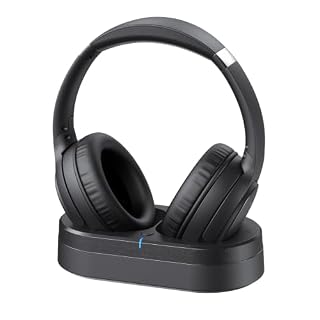
Crystal Clear TV Dialogue for Easy Listening: Hear every conversation, every line and every moment more clearly with wireless TV headphones made for relaxing everyday viewing. Ideal for seniors and anyone who struggles with unclear TV audio, these TV headphones wireless for seniors deliver enhanced dialogue clarity for movies, news, sports and late-night shows without turning up the TV volume for everyone else
View on Amazon2. Everyday Hearing Support for Clearer Dialogue
If you struggle to hear conversations even without the TV, hearing aids can make a world of difference. These discreet, rechargeable devices amplify speech while reducing background noise. They're comfortable for all-day wear, so you can enjoy TV shows and family chats with less strain. Great for mild to moderate hearing loss.
Helpful product to consider (paid link)

Hear What Matters Most: Hearing isn’t one-size-fits-all. That’s why our adjustable frequency system lets you personalize your sound experience - whether it’s deep voices, sharp tones, or the melody of your favorite song. Hear the details that matter to you, with crystal-clear conversations every time. It's time to hear real voices again just the way they were meant to sound.
View on Amazon3. Enlarge Tiny Subtitles and Text
Reading small text on screen or in a book can be frustrating. A portable video magnifier uses a camera to zoom in on anything—from subtitles to medication labels—and displays it on a bright LCD screen. With 2x-25x zoom, you can adjust to your needs. Ideal for low vision users who want to read comfortably on the couch.
Helpful product to consider (paid link)

2X-25X Magnification: Supports 2x/8x/16x/25x magnification to zoom in and out on text. Please note that the magnifier must be placed on books or newspapers for reading; otherwise, the image may appear blurry due to the fixed focus
View on Amazon4. Stream Shows with Large, Clear Display
An iPad is a versatile tool for watching TV, movies, and videos. Its large screen supports adjustable text size and contrast, making menus and subtitles easier to read. You can stream from apps like Netflix or YouTube, and even use it for video calls. Perfect for seniors who want a simple, portable device for entertainment and connection.
Helpful product to consider (paid link)

Smart Connector. 3.5 mm headphone jack. Stereo speakers. On/Off - Sleep/Wake. Home/Touch ID sensor. Dual microphones. Volume up/down. Nano-SIM tray (cellular models). Lightning connector
View on Amazon5. Amplified Phone to Keep in Touch
Staying connected with loved ones is important, but standard phones can be too quiet. An amplified phone boosts volume and clarity, with extra-loud ringers and tone control. This model also has a photo dialing feature for quick calls. Great for seniors with hearing loss who want to chat without shouting.
Helpful product to consider (paid link)

Amplified sound: The phone can amplify incoming calls to up to 40 decibels, which is about four times louder than a standard phone.
View on Amazon6. Read Books and Articles with Adjustable Text
For those who love to read but struggle with small print, an e-reader with adjustable font size and brightness is a game-changer. This portable device lets you enlarge text to your liking and read in any lighting. With long battery life, you can enjoy hours of reading without eye strain. Perfect for seniors with low vision.
Helpful product to consider (paid link)

E Book Reader: Independent flipping key allows easy preview of book content, making it convenient to find the desired chapter for a more enjoyable reading experience.
View on Amazon7. Comfortable Seating with Heat and Massage
Long TV sessions can be hard on the back and joints. A power lift recliner with heat and massage provides therapeutic comfort while you watch. It gently lifts you to a standing position, reducing strain. The oversized design offers ample room, and the remote control makes adjustments easy. Ideal for seniors with mobility issues.
Helpful product to consider (paid link)
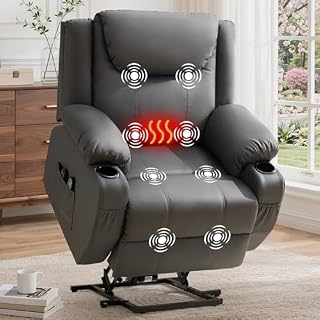
26" Extra Wide Seat: Based on our analysis of consumers with larger body types, we have designed this oversized recliner with an extra-wide seat, which is ideal for taller individuals and those who prefer a spacious seating area. Unlike large recliners, this lift recliner chair features a 26-inch seat width, significantly increasing the seating space. This reduces the feeling of being squeezed on either side of the body vastly and eliminates the inconvenience of getting out of the chair.
View on Amazon8. Easy Dialing for Quick Connection
When you need to call for help or just chat, a big-button phone with one-touch dialing makes it simple. This corded landline phone has large, backlit buttons and an SOS button for emergencies. It's easy to see and use, even for those with limited dexterity or vision. Perfect for seniors who want a reliable, user-friendly phone.
Helpful product to consider (paid link)

[9 One-Touch Large Buttons] This desk phone features 9 large buttons and 1 SOS Emergency Button that can store frequently dialed numbers. You can also replace the pictures on these buttons. Additionally, the phone includes 10 groups of two-button memory, making it simple for seniors or those with memory loss to access important contacts with ease
View on AmazonFrequently Asked Questions
How do wireless TV headphones work?
They connect to your TV via a transmitter that plugs into the audio output. The headphones receive the signal wirelessly, so you can hear TV audio at your own volume without disturbing others.
Can hearing aids help with TV listening?
Yes, many hearing aids have settings that enhance speech clarity and reduce background noise, making TV dialogue easier to understand. Some even connect directly to TVs via Bluetooth.
What is a video magnifier used for?
It magnifies printed text or objects, like subtitles on a screen, books, or labels. It's portable and can be used anywhere to help low vision users read more easily.
Are lift chairs safe for seniors?
Yes, they are designed with safety features like a stable base and easy-to-use remote. They gently lift the user to a standing position, reducing fall risk. Always check weight capacity and follow instructions.